SIDEBAR
»
S
I
D
E
B
A
R
«
Easy way to automatically update commercial WordPress plug-ins
Jan 27th, 2012 by Anton Oliinyk

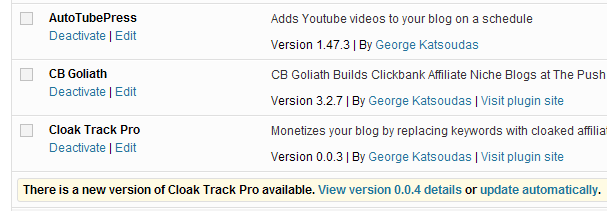
Update notification for a commercial plug-in

WordPress CMS has a nice auto update feature that displays update notifications for outdated plug-ins and themes in admin panel. Once you got a notification you can go to Dashboard->Updates and install all updates with few clicks while WordPress will automatically download and extract archives, remove old versions and reactivate plug-ins for you.

The only problem is  that it works for plug-ins published on wordpress.org which are open-source so it’s not an option for commercial plug-ins.

Luckily there is a very good solution to this problem: Upgrademe plug-in.
Read the rest of this entry »

PDFmyURL: export web pages with JavaScript elements to PDF on shared hosting
Apr 22nd, 2011 by Anton Oliinyk

Customers and users sometimes ask for an ability to save some reports from web applications to PDF files. It could be very tricky to write PDF directly but as far as you already have those reports on web pages you can add printable views of them and then ability to convert HTML/CSS of the pages to PDF, say with dompdf library.
This way you can hit two targets: add printing of reports and PDF export. Dompdf is still in beta but at least it could work on shared hosting AFAIK.

But what if you need to export web pages with JavaScript canvas elements like Flot charts that are plotted on browser side only? All available solutions require installing executables which is usually problematic on shared hosting.

The solution is PDFmyURL.com/ which you can easily use as a web-service: send GET requests with URL of the page you want to export and get PDF file as a response. The service is based wkhtmltopdf. As you can see, it’s good enough to convert pages with Flot charts:

http://pdfmyurl.com/?url=http://people.iola.dk/olau/flot/examples/basic.html.

You can call the service from JavaScript on your pages or from server-side scripts via any HTTP client library like cURL. All wkhtmltopdf options are supported and could be passed as GET request parameters.

Their free service inserts very small watermark to each page which is usually not a problem. But of course you can upgrade to paid service to remove it.

How to set InnoDB as a default storage engine for MySQL tables
Oct 26th, 2010 by Anton Oliinyk

I use InnoDB storage engine because of support for transactions and referral integrity rules. However, MySQL still creates new tables as MyISAM by default. It was so annoying  to always define storage engine when creating new tables and double check that I didn’t forget it until I found how to set InnoDB by default.

Read the rest of this entry »

Why MySQL timestamp is 24 seconds different from PHP
Oct 24th, 2010 by Anton Oliinyk

You may find the timestamp value returned by MySQL UNIX_TIMESTAMP() function 24 seconds grater than that returned by PHP functions and methods like strtotime(), mktime(), DateTime::getTimestamp(), Zend_Date::getTimestamp().

Read the rest of this entry »

Use Result Variable to Prepare Function Return Value
Dec 29th, 2009 by Anton Oliinyk

Many many years ago I learned Delphi language. It has one interesting feature not found in other languages: you don’t need return statement to specify return value for a function. Instead, you can use a pseudo-variable called Result. You can change its value many times during function execution but only the last value is returned.

That’s really a great idea! Even if your programming language doesn’t have such a built-in variable, why not to create it?
Most functions actually need a variable to forge future return value, so why call it differently if we can always call it result?

Read the rest of this entry »

PHP Regular Expressions and UTF-8
Dec 27th, 2009 by Anton Oliinyk

Perl-compatible regular expression functions in PHP can properly work with Unicode strings. Just add /u modifier to turn on UTF-8 support in preg_replace, preg_match, preg_match_all, preg_split and other PCRE (preg) functions. This way you can parse strings with national characters. For example:

$clean = preg_replace('/\s\s+/u', ' ', $dirty);

If used without /u modifier this code damages UTF-8 encoded strings by replacing national character bytes improperly interpreted as whitespace characters. This and many other problems are caused by improper interpretation of every byte as ASCII character which is not always true for UTF-8.

The modifier is available from PHP 4.1.0 or greater on Unix and from PHP 4.2.3 on win32. UTF-8 validity of the pattern is checked since PHP 4.3.5.
I found this tip as well as many other useful info on regular-expressions.info. It’s not easy to find it in the PHP documentation but it’s actually hidden here.

SEO-Friendly URLs and Relative Links
Dec 24th, 2009 by Anton Oliinyk

The Web community is going crazy about SEO-friendly URLs like http://somesite.com/products/network/router/. Well, it looks much better than a script URL http://somesite.com/products.php?c=network&p=router which may actually serve the page behind the scenes. There are a lot of good articles on how to implement SEO-friendly URLs, for example this one or my own post. But they do not warn the reader about one usual problem: once you have updated your site to handle virtual paths you will probably get a bad surprise:

CSS, image and internal page links are totally broken!

Why? Because those links are usually relative to the page location. The browser has no idea about virtual folders and tries to get files from locations relative to the page URL context. For example, if there is a usual CSS link in the page header:

<link rel="stylesheet" href="style.css" type="text/css" media="screen" />

Then the browser will try to download non-existing file http://somesite.com/products/network/router/style.css and fail silently. No CSS style will be applied.

It’s incredible how many words were spoken about SEO-friendly URLs with almost no word about this relative link problem.
So, what you have to do? Don’t worry, there are multiple solutions available and I’ll try to explain them all.

Read the rest of this entry »

SIDEBAR
»
S
I
D
E
B
A
R
«

Valid XHTML 1.0 Transitional